FLL Airport Parking Receipt: Complete 2026 Guide
Learn how to get, retrieve, and use your FLL airport parking receipt — covering on-site garages, off-site lots, digital receipts, expense reimbursement tips, and what to do if your receipt is wrong or missing.
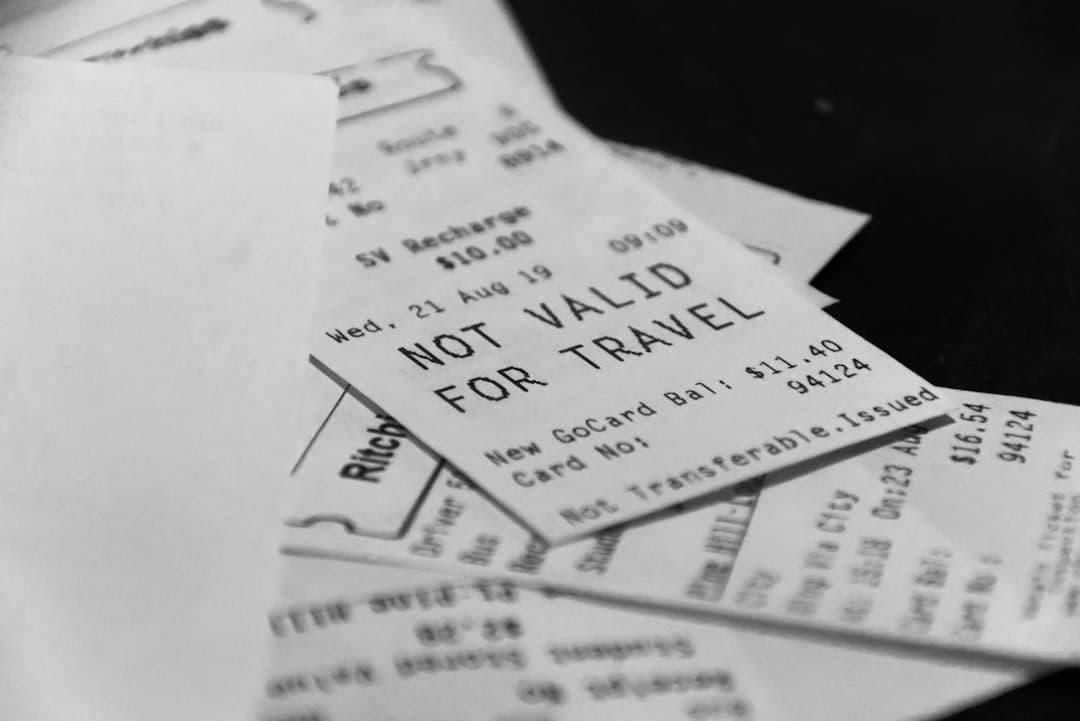
Book FLL airport parking — pick your dates
Pick your dates to search
Back to Fort Lauderdale Airport Parking: Complete 2026 Guide
An FLL airport parking receipt is an itemized record of your parking transaction at Fort Lauderdale-Hollywood International Airport, issued by the automated pay stations or third-party booking platforms when you park at on-site garages or nearby off-site lots. You receive a receipt automatically when you pay by credit or debit card at the exit kiosk, or via email when you pre-book through an online platform like Triply. Business travelers needing documentation for expense reports, and anyone who needs to dispute a charge, should know exactly how to get, retrieve, and use their FLL parking receipt.
- On-site garages (Hibiscus, Palm, Cypress): Pay at the automated kiosk on exit — a paper receipt prints automatically.
- Valet parking: Costs $30/day — a valet claim ticket and itemized receipt are issued at drop-off and exit.
- Overflow lot: Costs $10/day — receipt issued at the pay station.
- Off-site lots: Third-party booking confirmations (email) serve as your receipt, starting from $7.95/day.
- Lost receipts: Contact the FLL official parking page or the lot operator directly with your entry/exit date and payment card details.
- FACTA compliance: Receipts for credit/debit card payments must mask all but the last four digits of your card number — check yours for this.
How Do You Get a Receipt for FLL Airport Parking?
You get an FLL airport parking receipt automatically when you pay by credit or debit card at the exit kiosk in any on-site garage. The automated pay station prints a paper receipt on the spot. Most travelers never think about this until they need it for an expense report — so plan ahead.
Here is how the receipt process works for each parking option at Fort Lauderdale-Hollywood International Airport:
- Hibiscus Garage (Terminals 1–2): Pay at the automated kiosk when you exit. Card payments trigger an automatic paper receipt. Cash payments also produce a printed receipt.
- Palm Garage (Terminals 3–4): Same process as Hibiscus — exit kiosk issues receipt on payment.
- Cypress Garage (all terminals via free shuttle): Same kiosk system — receipt issued at exit.
- Valet parking ($30/day): You receive a valet claim ticket when you drop off. When you retrieve your vehicle, a final itemized receipt prints for the full duration.
- Overflow lot ($10/day): Receipt issued at the pay station before you exit.
Accepted payment methods at all FLL on-site parking facilities include Visa, Mastercard, Amex, Discover, cash, Apple Pay, and other contactless payments (verified May 2026). Any of these methods produce a printed receipt. If you use SunPass Plus to pay for parking, note that SunPass transactions are logged in your SunPass account — but a paper receipt is not printed at the gate. You would need to download your transaction history from the SunPass portal to get documentation.
Ready to book FLL parking and get a confirmed receipt before you even arrive? Compare on-site and off-site FLL parking options on Triply — rates from $7.95/day with instant email confirmation.
How to Retrieve a Lost or Missing FLL Parking Receipt
If you lost your paper receipt or forgot to grab it at the kiosk, you still have options. No competitor covers this end-to-end — here is exactly what to do.
- Check your email first. If you pre-booked online (via Triply, SpotHero, or another platform), your booking confirmation email is your receipt. Search your inbox for the lot name or confirmation number.
- Review your bank or card statement. Your credit or debit card statement shows the charge amount, date, and merchant. This is often sufficient for corporate expense reports when paired with a booking confirmation.
- Contact FLL parking customer service. The Broward County Aviation Department (BCAD) manages on-airport parking. Call the general parking information line at 954-359-0200 and provide your entry date, exit date, and the last four digits of the card used. They can look up your transaction and re-issue documentation.
- Contact your off-site lot directly. If you parked at a third-party lot, contact that lot's operator or the booking platform you used. Email is typically fastest — most platforms send a follow-up receipt on request.
- Dispute incorrect charges promptly. If your card was charged an incorrect amount, contact the parking operator first, then your card issuer if unresolved within a reasonable timeframe.
For travelers who pre-booked, the email confirmation is the most reliable backup. This is one reason we always recommend booking in advance — you get a timestamped digital record before you even park. See our guide on Fort Lauderdale airport prepaid parking for the full booking process and what your confirmation includes.
What Information Appears on an FLL Airport Parking Receipt?
A standard FLL on-site parking receipt contains specific line items. Knowing what to expect helps you verify accuracy and satisfy expense report requirements.
| Receipt Field | What It Shows | Why It Matters |
|---|---|---|
| Facility Name | Hibiscus Garage, Palm Garage, Cypress Garage, Valet, or Overflow | Confirms which lot you used |
| Entry Date & Time | Timestamp of when you entered | Establishes duration for billing |
| Exit Date & Time | Timestamp of when you exited | Confirms total time parked |
| Duration | Total hours or days | Ties to the rate tier charged |
| Rate Applied | Short-term ($36/day), Long-term ($20/day), Valet ($30/day), Overflow ($10/day) | Shows which pricing tier was used |
| Total Charged | Dollar amount billed | Matches your card statement |
| Payment Method | Card type + last 4 digits (FACTA-compliant masking) | Confirms how you paid; protects card data |
| Transaction ID | Unique reference number | Needed for disputes or re-issue requests |
FACTA compliance is important here. Under the Fair and Accurate Credit Transactions Act, any receipt issued for a credit or debit card transaction must show no more than the last five digits of the card number — and must not display the card's expiration date. FLL's automated pay stations follow this rule. If your receipt shows more than the last four digits of your card number, report it to the parking operator immediately.
One detail many travelers miss: the 20-minute grace period at FLL on-site garages. If you exit within 20 minutes of entry, you are typically not charged. In that case, your receipt may show a $0.00 balance. This matters if you are trying to reconcile a charge that never appeared on your card.
How Do Off-Site FLL Parking Receipts Work?
Off-site parking receipts work differently from on-airport kiosk receipts. The process depends on how you booked and which lot you used.
When you book through an online platform like Triply, you receive an email confirmation immediately after payment. That confirmation acts as your receipt. It shows the lot name, your booking dates, the daily rate, and the total charged. This is the document to save for expense reports.
Here is how receipts work at the seven verified off-site FLL lots (verified May 2026):
| Lot Name | Rate | Receipt Method | Cancellation |
|---|---|---|---|
| Rodeway Inn & Suites FLL Airport Parking | $7.95/day | Booking confirmation email | Free cancellation |
| Park By The Ports (FLL) | $7.99/day | Booking confirmation email | Free cancellation |
| Tropical Airport Parking at Homewood Suites (FLL) | $8.95/day | Booking confirmation email | Free cancellation |
| Best Western Plus Fort Lauderdale Airport & Cruise Port (FLL) | $8.99/day | Booking confirmation email | Free cancellation |
| FastTrack Fort Lauderdale Airport Parking | $9.95/day | Booking confirmation email | Free cancellation |
| Gold Coast FLL Airport Parking | $9.95/day | Booking confirmation email | Free cancellation |
| Self Park FLL | $9.99/day | Booking confirmation email | Free cancellation |
All seven verified off-site lots near FLL range from $7.95 to $9.99 per day — compared to $20/day for long-term on-site parking and $36/day for short-term. That means off-site parking can save you up to 60% versus on-airport short-term rates, based on current Triply data. Your booking confirmation receipt documents that lower rate for reimbursement purposes.
For a full comparison of off-site options and their shuttle schedules, see our guide on Fort Lauderdale airport off-site parking.
Does FLL Airport Parking Offer Email or Digital Receipts?
FLL's on-site automated pay stations print paper receipts — they do not currently email receipts at the exit kiosk. If you need a digital copy, your best options are to photograph the paper receipt immediately, or to pre-book online and use your email confirmation as documentation.
For SunPass Plus users: your parking payment is deducted from your SunPass account automatically. No paper receipt is issued. To get documentation, log into your SunPass account at sunpass.com and download your transaction history. The transaction log shows the date, location, and amount — acceptable for most expense reports, though some corporate policies require a merchant-issued receipt specifically.
Pre-booking through platforms like Triply, SpotHero, or similar services always generates an email confirmation immediately. That digital record is easy to forward to an employer or accountant. For business travelers especially, pre-booking is the most reliable way to ensure you have proper documentation without worrying about a paper slip.
How Do You Use Your FLL Parking Receipt for Expense Reimbursement?
Business travelers flying through FLL frequently need to submit parking costs for reimbursement. A proper FLL parking receipt satisfies most corporate travel policies — here is what you need to know.
- Check your company's receipt threshold. Many companies require itemized receipts for expenses over $25. At $20/day for long-term parking, even a two-day stay clears that threshold.
- Keep the paper receipt or take a photo immediately. FLL kiosk receipts are small thermal slips that fade quickly. Photograph it as soon as you exit.
- Match the receipt to your card statement. Your expense report typically needs both the receipt and the card statement showing the matching charge.
- Use your booking confirmation for off-site lots. Email confirmations from Triply or other platforms show the lot name, dates, rate, and total — everything a reimbursement form requires.
- Note the parking tier on your receipt. Short-term ($36/day) vs. long-term ($20/day) vs. overflow ($10/day) are distinct line items. Some corporate policies only reimburse up to economy/long-term rates — knowing your tier avoids surprises.
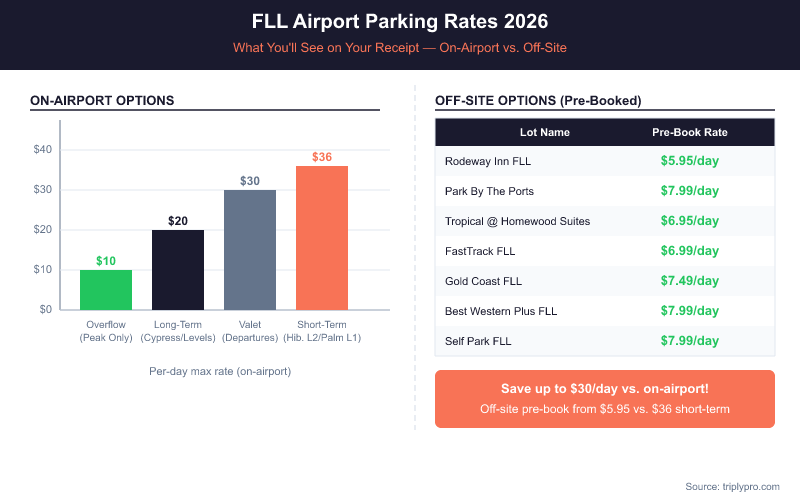
If you need to justify choosing off-site parking instead of on-airport garages, the savings are clear. Parking at Park By The Ports (FLL) at $7.99/day versus the on-site long-term rate of $20/day saves $12.01 per day — that is $84 saved on a one-week trip. Your booking confirmation documents that decision. For more on getting the best deal, check out our coverage of FLL airport parking coupon codes and discount strategies.
What Are the FLL Airport Parking Rates You'll See on Your Receipt? (2026)
Your receipt will reflect the specific rate tier applied to your stay. These are the current official on-airport rates at Fort Lauderdale-Hollywood International Airport (per FLL's official parking page, verified May 2026):
| Parking Option | Location | Rate (2026) | Serves |
|---|---|---|---|
| Short-Term Parking | Hibiscus Level 2, Palm Level 1 | $36/day | Terminals 1–4 |
| Long-Term Parking | Hibiscus Levels 3–7, Palm Levels 2–4, Cypress Levels 7–9 | $20/day | Terminals 1–4 |
| Valet Parking | Curbside at terminals | $30/day | All terminals |
| Overflow Parking | Overflow lot with free shuttle | $10/day | All terminals |
| Off-Site Lots (via Triply) | 3–10 minutes from airport | $7.95–$9.99/day | All terminals (free shuttle) |
FLL's on-site garages hold a total of approximately 11,000 vehicles across all facilities. The Hibiscus Garage serves Terminals 1 and 2 (Alaska Airlines, Southwest, Delta, and others). The Palm Garage serves Terminals 3 and 4 (American Airlines, JetBlue, Spirit Airlines). The Cypress Garage serves all terminals via the free Breeze shuttle. Your receipt will note which facility you used — important if you need to verify the correct rate tier was applied.
FLL is currently undergoing a $3.2 billion capital improvement program, including Terminal 5 (expected mid-2026) and Palm Garage reconstruction. No major parking closures are expected in 2026, and rates remain stable as of this writing. For overnight and multi-day cost projections, see our detailed FLL overnight parking rates guide.
Who Do You Contact If Your FLL Parking Receipt Is Incorrect?
If your FLL parking receipt shows the wrong amount, wrong dates, or an incorrect rate tier, act quickly. Here is the escalation path:
- Start at the parking exit booth or kiosk. If you notice the error before leaving, flag it immediately. A parking attendant can void and re-process the transaction on the spot.
- Call FLL parking customer service. The general parking inquiry line is 954-359-0200. Have your entry date, exit time, transaction ID (from your receipt), and payment card details ready.
- Email or contact the lot operator directly. For off-site lots, contact the operator or the booking platform (Triply, SpotHero, etc.) via email. Most respond within one business day.
- Dispute with your card issuer if needed. If the operator does not resolve the error within a reasonable time, contact your credit or debit card provider. Card disputes are typically resolved within 30–60 days. Your receipt and card statement together make a strong case.
- Check for FACTA violations. If your receipt displays more than five digits of your card number or shows your expiration date, that is a FACTA violation. Report it to the Federal Trade Commission at ftc.gov/complaint.
For broader parking account and policy questions managed by Broward County Aviation Department (BCAD), the official resource is the Broward County Airport page. If your issue involves a pre-booking through a third party, always start with that platform's customer service — they have access to your booking record and can re-send receipts instantly.
Need to book FLL parking with a guaranteed email receipt from the moment you confirm? Search FLL parking options on Triply — compare rates from $7.95/day at verified lots with instant digital confirmation.
View the Complete FLL Airport Parking Guide for 2026
Compare FLL parking rates — a typical off-airport lot near Fort Lauderdale-Hollywood International Airport costs about 63% less per day than the airport's own terminal garage.
Frequently Asked Questions
Looking for the complete guide?
Fort Lauderdale Airport Parking from $7/day | 2026 GuideMore FLL Parking Guides
Fort Lauderdale Airport Parking Sold Out? What to Do Now (2026)
Fort Lauderdale Airport Hibiscus Parking Garage 2026

FLL Airport Parking Delta: 2026 Terminal 2 Guide
FLL Airport Parking Terminal 4: 2026 Complete Guide
FLL Airport Parking JetBlue: 2026 Rates & Terminal Guide

Does FLL Airport Have Valet Parking? 2026 Rates & Guide
Ready to book your FLL airport parking? Find Parking Now