Fort Lauderdale Airport Parking Receipt: 2026 Guide
Learn how to get, retrieve, or reprint your Fort Lauderdale airport parking receipt at FLL. Covers SP+ cashier booths, SunPass Plus, off-site lots, expense reimbursement, and FACTA compliance.

A Fort Lauderdale airport parking receipt is the printed or digital proof of payment issued when you park at Fort Lauderdale-Hollywood International Airport (FLL) — managed by SP+ Parking on behalf of the Broward County Aviation Department (BCAD). You can get a receipt at the cashier booth, from the automated credit card exit terminal, or through your third-party booking confirmation. If you lose it, SP+ Parking can often retrieve transaction records by date, ticket number, or credit card used.
- On-airport receipts print automatically at the exit lane or cashier booth in the Hibiscus, Palm, and Cypress Garages.
- Lost receipts can be requested by contacting SP+ Parking at (954) 359-0200 with your entry date, exit time, and payment card details.
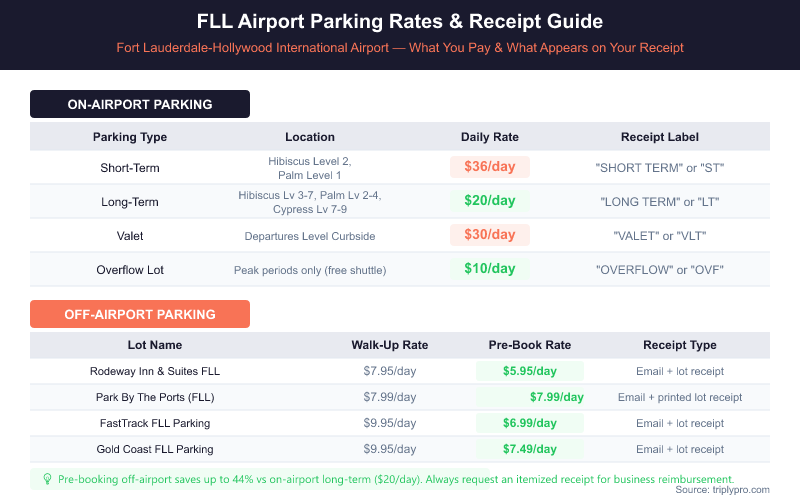
- FLL parking rates in 2026 range from $10/day (Overflow) to $36/day (Short-Term), and all appear as a single line-item charge on your receipt.
- Off-airport lots like Park By The Ports and FastTrack issue separate booking confirmations — these serve as your receipt for expense reports.
- Business travelers can use any itemized FLL parking receipt for expense reimbursement — the receipt must show entry date, exit date, location, and total amount.
- FACTA compliance requires FLL receipts to truncate credit card numbers — only the last four digits should appear on your printed copy.
Back to Complete FLL Airport Parking Guide
How Do You Get a Receipt for Fort Lauderdale Airport Parking?
Getting a receipt at FLL depends on how you pay. Every standard exit method produces some form of proof of payment — printed, emailed, or digital.
At the Hibiscus Garage (serving Terminals 1 and 2), Palm Garage (serving Terminals 3 and 4), and Cypress Garage (all terminals via free shuttle), automated pay stations print a receipt when you settle your balance before heading to the exit lane. If you pay at the exit lane with a credit card, the terminal prints a receipt automatically. At staffed cashier booths, ask the attendant for a receipt — they can print one on request.
If you booked parking in advance through a third-party site, your booking confirmation email acts as your receipt. Print it or save it to your phone before you arrive. Keep your entry ticket as well — some lots require it alongside the confirmation for exit.
For SunPass Plus users, the transaction posts to your SunPass account within a few days. Log in at the SunPass portal to view and download an itemized transaction record. This is your de facto receipt for that payment method.
Ready to pre-book FLL parking from $7.95/day and get an instant confirmation receipt? Compare FLL off-airport parking rates on Triply — you'll get a booking confirmation you can submit straight to expenses.
What Payment Methods Issue Receipts at FLL?
FLL garages accept multiple payment methods, and each one produces a receipt in a different format (verified April 2026).
| Payment Method | Receipt Format | How to Retrieve if Lost |
|---|---|---|
| Credit/Debit Card (exit lane) | Printed slip at terminal | Call SP+ at (954) 359-0200 with card and date |
| Cash (cashier booth) | Printed slip from attendant | Request duplicate at parking office — limited availability |
| SunPass Plus | Online account transaction record | Log in to SunPass account, download PDF |
| Apple Pay / Contactless | Printed slip at terminal | Call SP+ at (954) 359-0200 with date and amount |
| Third-Party Booking (Triply, etc.) | Email confirmation PDF | Check booking email or log in to provider account |
FLL garages accept Visa, Mastercard, Amex, Discover, Apple Pay, and contactless payment at automated pay stations. Cash payments are handled at staffed booths. Each method produces a record — the key difference is whether that record is paper, digital, or account-based.
Contactless and Apple Pay transactions print the same physical receipt as chip-and-pin cards. The only method that does not auto-print is SunPass Plus — you pull that record yourself from the online portal. If you regularly park at FLL on SunPass, set up monthly account exports so you always have documentation ready for expense reports.
How Do You Find or Reprint a Lost FLL Parking Receipt?
Losing your FLL parking receipt is fixable in most cases. SP+ Parking, which operates FLL's garages, keeps transaction records and can issue duplicates.
Follow these steps to recover a lost receipt:
- Call SP+ Parking at (954) 359-0200. Have your entry date, approximate exit time, and the last four digits of the card you used ready.
- Provide your ticket number if you still have the entry stub. This speeds up the lookup significantly.
- Request a duplicate receipt by email or fax — SP+ can typically send a PDF copy for credit card transactions.
- For SunPass Plus payments, log in to your SunPass account at the Florida Department of Transportation portal and download the transaction history for the relevant dates.
- For third-party bookings, log in to your account on Triply, SpotHero, or whichever platform you used — booking confirmations are always stored in your account history.
There is no published official limit on how far back SP+ can retrieve records, but travelers typically report success recovering receipts up to 12 months after the transaction. For older records, contact the BCAD Parking Office directly through the FLL official parking page.
If you paid cash and lost your receipt, recovery is harder. Cash transactions at staffed booths may not be retrievable without your original ticket number. This is one reason credit card or digital payment is worth considering — the paper trail is automatic.
What Information Appears on a Fort Lauderdale Airport Parking Receipt?
A standard FLL parking receipt includes several key fields that matter for reimbursement and record-keeping.
- Location name: Facility name (e.g., "FLL Hibiscus Garage" or "FLL Palm Garage")
- Entry date and time: When your vehicle entered the lot
- Exit date and time: When you exited
- Duration: Total hours or days parked
- Rate applied: Short-term ($36/day), Long-term ($20/day), Valet ($30/day), or Overflow ($10/day)
- Subtotal and taxes: Itemized breakdown of charges
- Total amount charged: Final amount paid
- Payment method: Card type and last four digits only (FACTA-compliant truncation)
- Transaction or ticket number: Unique identifier for disputes or duplicate requests
- SP+ Parking operator info: Contact details for the parking operator
The FACTA (Fair and Accurate Credit Transactions Act) requires that printed receipts show no more than the last five digits of a card number — and most FLL receipts show only the last four. If you receive a receipt showing more than five card digits, that is a compliance issue worth flagging to SP+. FLL faced a class action over FACTA truncation practices in previous years, which prompted stronger compliance at the automated terminals.
How Do Off-Airport FLL Parking Receipts Work?
Off-airport lots near FLL handle receipts differently from the on-airport garages. Most third-party lots send a booking confirmation email the moment you reserve — that email is your primary receipt.
| Lot Name | Rate | Receipt Type | Shuttle Frequency |
|---|---|---|---|
| Rodeway Inn & Suites FLL Airport Parking | $7.95/day | Email confirmation + lot receipt on exit | Free shuttle, on request |
| Park By The Ports (FLL) | $7.99/day | Email confirmation + printed lot receipt | Free 24/7, every 10-15 min |
| Tropical Airport Parking at Homewood Suites | $8.95/day | Email confirmation + hotel receipt | Free, every 15-20 min |
| Best Western Plus Fort Lauderdale Airport | $8.99/day | Email confirmation + hotel receipt | Free, hourly schedule |
| FastTrack Fort Lauderdale Airport Parking | $9.95/day | Email confirmation + printed lot receipt | Free, every 10-15 min |
| Gold Coast FLL Airport Parking | $9.95/day | Email confirmation + lot receipt | Free, on-demand |
| Self Park FLL | $9.99/day | Email confirmation + lot receipt | Free shuttle service |
When you book through a platform like Triply, your confirmation email serves as a full receipt — it includes the lot name, dates, rate, and total charge. Save this email. Many corporate travel systems accept a booking confirmation as valid documentation without needing a separate lot receipt.
Off-airport lots at FLL range from $7.95 to $9.99/day — compared to $20/day for on-airport long-term parking. That is a savings of up to 60% versus the on-airport rate. For business travelers, the lower rate with a clean receipt is a strong combination. If you want more detail on off-airport options, see our guide to Fort Lauderdale off-airport parking.
Can You Use an FLL Parking Receipt for Business Expense Reimbursement?
Yes. An FLL parking receipt is a valid business expense document as long as it includes the required fields. Most corporate travel policies require an itemized receipt — not just a credit card statement.
For reimbursement, your receipt should show:
- Parking facility name and address (e.g., FLL Hibiscus Garage, Fort Lauderdale, FL)
- Entry and exit dates (to confirm business travel dates)
- Total amount paid (not just the card charge)
- Payment method (last four digits of card is sufficient for most policies)
If you pre-booked through a third-party provider, your booking confirmation email typically contains all of these fields. Print it as a PDF and attach it to your expense report. For SunPass Plus payments, download the transaction detail from your SunPass account — it shows the date, location, and amount, which satisfies most expense systems.
Some companies require original receipts for parking charges over a certain threshold. If your stay was long enough to hit the $20/day long-term rate over multiple days — for example, a five-day trip totaling $100 — getting a proper itemized receipt from SP+ before you leave the garage is worth the extra minute at the pay station. For details on how prepaid bookings affect your documentation, see our guide to Fort Lauderdale airport prepay parking.
What Are the Current FLL Parking Rates and How Do They Appear on Your Receipt?
FLL's on-airport rates in 2026 are set by the Broward County Aviation Department and managed by SP+ Parking (verified April 2026).
| Parking Type | Location | Daily Rate | Receipt Label |
|---|---|---|---|
| Short-Term | Hibiscus Level 2, Palm Level 1 | $36/day | "SHORT TERM" or "ST" |
| Long-Term | Hibiscus Levels 3-7, Palm Levels 2-4, Cypress Levels 7-9 | $20/day | "LONG TERM" or "LT" |
| Valet | Terminal curbside drop-off | $30/day | "VALET" |
| Overflow | Overflow Lot (free shuttle) | $10/day | "OVERFLOW" |
Your receipt will show the rate category applied to your stay — not just a dollar total. This matters when checking for errors. If you parked on Hibiscus Level 4 (a long-term level) but your receipt shows the short-term rate of $36/day, contact SP+ immediately. Mistakes happen at automated terminals, and having the receipt in hand is how you dispute them.
The receipt also shows the precise time-based calculation. FLL charges by the day, but the clock starts from entry. A partial day typically counts as a full day unless you exit within any applicable grace period. Always check the entry and exit times on your receipt — they confirm whether the day-count is accurate.
FLL is currently in the middle of a $3.2 billion capital improvement program, including a new Terminal 5 expected to open mid-2026. Parking infrastructure is expanding alongside — and the official FLL parking page is the best source for any rate changes tied to new facilities.
What Was the FLL Parking Receipt Class Action — and Does It Affect You?
The FACTA (Fair and Accurate Credit Transactions Act) class action related to FLL parking centered on printed receipts that displayed too many credit card digits. Federal law limits printed receipts to show no more than the last five digits of any payment card number — and prohibits showing the expiration date entirely.
Past complaints alleged that automated exit terminals at FLL garages printed receipts that exceeded this limit. The settlement required SP+ Parking to update terminal software to ensure full truncation compliance. As of 2026, FLL receipts should display only the last four digits of your card and no expiration date.
This directly affects you if you're reviewing old receipts. Check any FLL parking receipt from before 2022 — if it shows more than five card digits or includes an expiration date, your card data was technically over-exposed. While the settlement addressed the practice going forward, keep older receipts out of unshredded trash. For current transactions, the compliance fix is in place and your receipt should be properly truncated.
The class action does not affect whether your receipt is valid for expense reimbursement or dispute purposes. Your receipt remains your primary proof of payment regardless of this history. If you have questions about a specific receipt, the FLL parking team at SP+ handles inquiries at (954) 359-0200.
Save on FLL Parking — and Keep Your Receipt Simple
Getting a clear, usable Fort Lauderdale airport parking receipt starts before you even arrive. Pre-booking through a trusted platform means your confirmation email is your receipt — no waiting at a pay station, no risk of losing a paper slip. Off-airport lots at FLL start at $7.95/day, saving you up to 60% versus on-airport long-term rates of $20/day. Every lot on Triply offers free cancellation, so you're not locked in.
Compare FLL airport parking options from $7.95/day on Triply — get an instant booking confirmation that works as your receipt for business or personal travel.
Frequently Asked Questions
Looking for the complete guide?
Fort Lauderdale Airport Parking from $7.95/day | 2026 GuideMore FLL Parking Guides
Fort Lauderdale Airport Parking Sold Out? What to Do Now (2026)
Fort Lauderdale Airport Hibiscus Parking Garage 2026

FLL Airport Parking Delta: 2026 Terminal 2 Guide
FLL Airport Parking Terminal 4: 2026 Complete Guide
FLL Airport Parking JetBlue: 2026 Rates & Terminal Guide
FLL Airport Parking Receipt: Complete 2026 Guide
Ready to Book Your FLL Airport Parking?
Compare prices from top-rated parking lots and save up to 70% on your next trip.
Find Parking Now